Network Calculator for Android

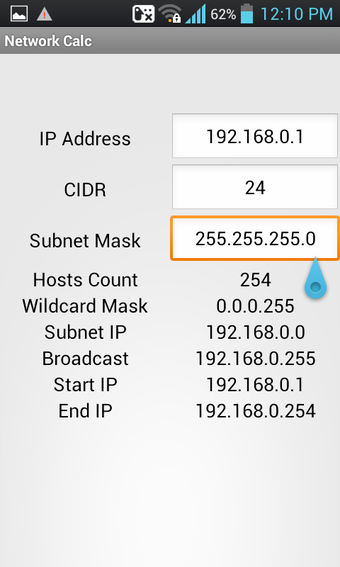
Network Calculator is a free Android application developed by EONSOFT. It is a simple and easy-to-use tool that helps users calculate various network parameters. The app requires the user to enter the IP address to calculate the following information: CIDR, subnet mask, number of hosts, wildcard mask, broadcast, start IP, and end IP.

The interface of the app is straightforward and user-friendly. Users can easily navigate through the app and enter the required information. The app provides accurate results and is a useful tool for network administrators, IT professionals, and students studying networking. The app is available for free and can be downloaded from the Google Play Store.

Overall, Network Calculator is a useful tool for anyone who needs to calculate network parameters. It is easy to use, provides accurate results, and is available for free. However, it lacks advanced features that some users may require.

 0/1

App specs

  • License

    Free

  • Version

    1.9.1
  • Latest update

  • Platform

    Android

  • OS

    Android 15.0

  • Language

    English

    Available languages

    • Greek
    • English
    • Italian
    • Arabic
    • Czech
    • Spanish
    • Dutch
    • Portuguese
    • Norwegian
    • Turkish
    • Chinese
    • French
    • Hindi
    • Finnish
    • Japanese
    • Chinese
    • Korean
    • German
    • Russian
    • Polish
    • Danish
    • Portuguese
    • Swedish
  • Downloads

    12

    Last month's downloads

    • 2
  • Size

    6.44 MB

  • Developer

  • Download Options

    APK, Google Play

  • Filename

    AF3DWBfkGpzLDiMDFxTo4XhicYUCStAldu_bYSMV_CIXaT0cwiKkAHLNQM-R5XqAU6SL216F-h171FBd9r9ZnO3TfWggmM2DXvkCzT47Zpi-w7rrQVzAiibGPdWFrxRXmWBhzW6AZ61jYSAJ3_qPPCh38FCjFuTHZw

Program available in other languages


User reviews about Network calculator

Have you tried Network calculator? Be the first to leave your opinion!

You may also like

Explore Apps

Latest articles

Laws concerning the use of this software vary from country to country. We do not encourage or condone the use of this program if it is in violation of these laws.
Softonic
Your review for Network calculator
Softonic

Is Network calculator safe?

100/100

Score result: Clean

This file passed a comprehensive security scan using VirusTotal technology. It is safe to download.

  • Virus free
  • Spyware free
  • Malware free
  • Verified by Security Partners

    VirusTotal logo

Scan Info

Last scan
Friday, October 3, 2025
Scan provider
VirusTotal · Full report

File Integrity

File
AF3DWBfkGpzLDiMDFxTo4XhicYUCStAldu_bYSMV_CIXaT0cwiKkAHLNQM-R5XqAU6SL216F-h171FBd9r9ZnO3TfWggmM2DXvkCzT47Zpi-w7rrQVzAiibGPdWFrxRXmWBhzW6AZ61jYSAJ3_qPPCh38FCjFuTHZw
SHA256
67e8aae85337edeb0a87ec20d53b0263faf6f55b184b024f2ca6d974b7e59e5d
SHA1
aafb584da4aa1cf23df2c71f20668ea0fc378e6e

Softonic security commitment

Network calculator has been thoroughly scanned by our advanced security systems and verified by industry-leading partners. This file comes from the official developer and has passed all our security checks, showing no signs of viruses, malware, or spyware.